Overview
Two Different Approaches
Breadth: Many Features, Uneven Polish
Mautic: A marketing automation suite that covers email, SMS (Twilio), push notifications (OneSignal), landing pages, forms, lead scoring, lifecycle stages, and social monitoring. Long feature list, but many capabilities lack the polish and reliability of purpose-built tools. The admin interface is built on Bootstrap 3 (2013) with legacy frontend libraries, and most features depend on cron jobs to function.
Depth: Email Done Right
Notifuse: A modern email platform focused on email marketing, transactional email, automations, blogging, and AI content generation. Native ESP integrations with batch sending and bounce management, MJML code editor, and simple Docker deployment.
Mautic is a 10+ year old open-source marketing automation platform built on PHP/Symfony. It offers a wide range of marketing tools—from email and SMS to landing pages and lead scoring. However, many of these features have rough edges: segments rebuild on cron schedules instead of updating in real-time, ESP integrations through Symfony Mailer lack batch sending and bounce management, A/B testing requires manual winner selection, and the UI is still built on Bootstrap 3 with a redesign that hasn't shipped yet.
Notifuse takes a focused approach to email—and does it right. Real-time segmentation, native ESP API integrations with batch sending and bounce management, A/B testing with automatic winner selection, a dedicated transactional API, MJML code editor, and multi-tenant workspaces. Every feature is production-ready with >80% test coverage, not a checkbox on a feature list.
Quick Comparison
| Notifuse | Mautic | |
|---|---|---|
| Starting Price | From $16/mo (Cloud) · or Self-hosted | Self-hosted only |
| License | Open source on a delay — BSL 1.1, AGPL-3.0 after 4 years | GPL v3 |
| Best For | Email marketing, transactional email & developer-friendly automations | Full marketing automation with multi-channel (SMS, push, social) |
| Setup Complexity | Docker one-click deploy, setup wizard | PHP, Composer, MySQL, 3-17 cron jobs, web server config |
| User Interface | Modern UI built with current technologies | Aging UI built on Bootstrap 3 (2013, EOL 2019) — redesign in progress |
| Visual Email Builder | MJML drag-and-drop & code editor | GrapesJS builder with MJML themes (no code editor) |
| ESP Integrations | Native APIs: Amazon SES, Mailgun, Postmark, SendGrid, Mailjet, SparkPost | SendGrid API built-in; others via Symfony Mailer (no batch sending) |
| Multi-tenancy | Yes (Workspaces) | No |
Pricing & Infrastructure
Both platforms are free and open-source. But Notifuse also offers Notifuse Cloud — a fully managed service with support starting at $16/mo. Mautic has no official managed hosting with professional support.
Notifuse Cloud
- ✓ Managed infrastructure & automatic updates
- ✓ All features on every plan
- ✓ Unlimited emails (BYO-ESP)
- ✓ 14-day free trial
Or self-host — open source on a delay (BSL 1.1 → AGPL-3.0)
Mautic
Self-hosted only (GPL-3.0)
- ✗ No official managed service
- ✗ Community support only (forums, GitHub)
- ✗ No professional SLA
- ✗ You manage servers, updates, and cron jobs
For teams who prefer self-hosting, here's how the infrastructure requirements compare:
Notifuse Setup
- Single Docker container + PostgreSQL
- Setup wizard on first launch
- One-click deploys (PikaPods, RepoCloud, Sealos, Northflank)
- No cron jobs needed
Mautic Setup
- PHP 8.2+, Composer, MySQL/MariaDB, Apache/Nginx
- Docker images available (not production-ready out of the box)
- 3 essential + up to 14 optional cron jobs (segments, campaigns, triggers, broadcasts, imports, bounces, webhooks, reports, etc.)
- Third-party options: Cloudron, DDEV for local dev
Why This Matters
Mautic's cron jobs are not optional—without them, segments don't update, campaigns don't trigger, and emails don't send. Each cron job needs to be staggered at specific intervals to avoid server overload. Notifuse handles all background processing internally with no external scheduler required. Or skip self-hosting entirely with Notifuse Cloud — fully managed, starting at $16/mo.
No Lock-in
Full database export on demand. Notifuse is open source on a delay (BSL 1.1 → AGPL-3.0) — switch between Cloud and self-hosted anytime and keep all your data.
Visual Email Builder
Both platforms use MJML for responsive email rendering. The key difference is that Notifuse exposes a full MJML code editor alongside the visual builder, while Mautic uses MJML as a theme framework within GrapesJS without direct code access.
Email Editor Comparison
| Feature | Notifuse | Mautic |
|---|---|---|
| Visual Email Builder | MJML-based drag-and-drop editor | GrapesJS builder with MJML theme support |
| MJML Code Editor Switch between visual and code modes freely | Direct MJML code editing alongside visual drag-and-drop | |
| Templating Engine Dynamic variables for personalization | Liquid | Twig (Symfony) |
| Built-in File Manager | S3-compatible storage with CDN support | Basic asset manager |
| Template Versioning Every update creates a new version | Automatic version history | |
| Support for Test Data Preview emails with sample contact data |
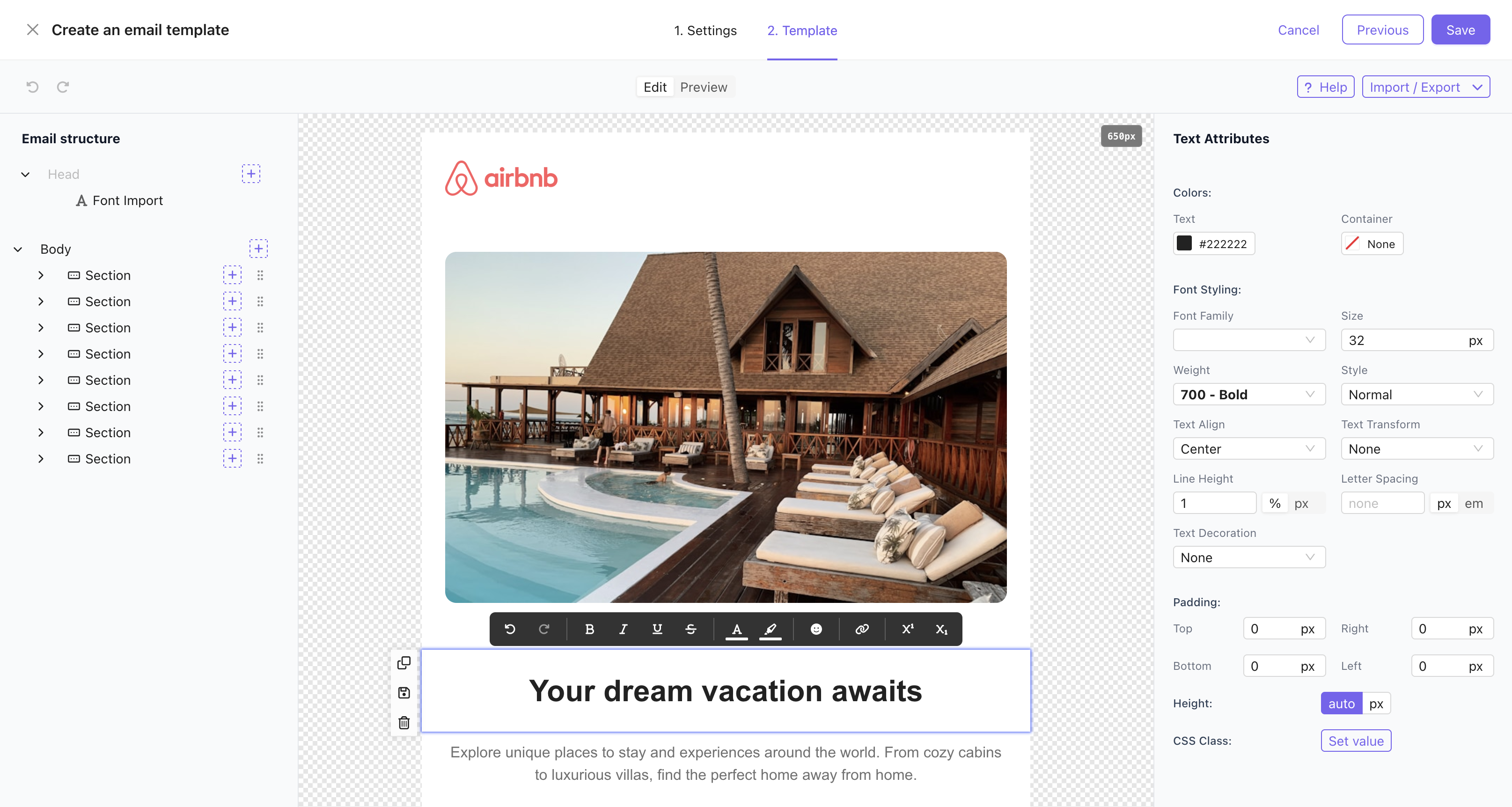
Notifuse UI - MJML Email Builder with Code Editor
Why This Matters
Direct MJML code access means developers can fine-tune responsive layouts, build reusable components, and debug rendering issues without leaving the editor. For marketers, the visual builder handles everything—no code required. Having both modes in one editor means your team can work however they prefer.
Campaigns
Both platforms support broadcast email campaigns with segmentation. Notifuse adds automatic A/B winner selection and data feeds for dynamic content.
Campaign Features
| Feature | Notifuse | Mautic |
|---|---|---|
| Broadcast Campaigns | Segment emails | |
| Filter by Segments | ||
| A/B Testing with Auto Winner | Auto winner by open rate or click rate | Manual winner selection only |
| UTM Tracking | Automatic on all external links | Supported via UTM tags feature |
| Schedule in Timezone Server timezone only in Mautic | ||
| Global Data Feed | Single API call, cached data shared across all recipients | |
| Per-Recipient Data Feed Personalize emails with real-time data (product recs, pricing, inventory) | Individual API calls with contact-specific data | |
| Campaign Analytics |
Transactional Email
Notifuse has a dedicated transactional email API designed for application-triggered emails. Mautic can send emails to existing contacts via its API, but has no purpose-built transactional endpoint.
Transactional Email Features
| Feature | Notifuse | Mautic |
|---|---|---|
| Dedicated Transactional API | Full REST API with dynamic data, CC/BCC | No dedicated endpoint — send pre-built emails to existing contacts only |
| SMTP Bridge | ||
| Auto Contact Creation Contact must pre-exist in Mautic | Upsert contacts on send | |
| Attachments | 20 files, 3MB each, 10MB total | |
| Deduplication | external_id based |
Contact Management & Segmentation
Both platforms offer contact management and dynamic segmentation. Mautic adds lead scoring, lifecycle stages, and anonymous visitor tracking. Notifuse adds RFM segmentation and real-time segment updates.
Contact & Segmentation Features
| Feature | Notifuse | Mautic |
|---|---|---|
| Custom Contact Fields | 20 fields (5 string, 5 number, 5 datetime, 5 JSON) | 20+ field types, unlimited custom fields |
| Dynamic Segments | Real-time, auto-updating | Cron-dependent rebuild (every 15 min) |
| RFM Segmentation | Segment by Recency, Frequency & Monetary value | |
| Activity Timeline Complete history of emails, events, and profile changes | ||
| CSV Import | Auto-mapping & progress tracking | Field mapping with background processing |
| Geolocation | Web visitor geo + live map (Web Analytics); not a stored contact field | IP-based (MaxMind GeoLite2) |
| Anonymous Visitor Tracking | Cookieless first-party tracking — anonymous sessions, then identified visits on the timeline | Cookie/IP-based tracking before identification |
| Lead Scoring | Points system with triggers and point groups | |
| Lifecycle Stages | Forward-only stage progression |

Notifuse UI - Contact Profile with Activity Timeline
Different Priorities
Mautic offers geolocation, anonymous visitor tracking, lead scoring, and lifecycle stages—useful for full-funnel marketing automation. Notifuse focuses on what matters most for email: real-time dynamic segments that update instantly (no cron delay) and RFM segmentation to target contacts by purchase behavior. For email-first teams, real-time segmentation and RFM analysis deliver more actionable targeting than website tracking.
Email Sending & Deliverability
Notifuse integrates natively with major ESP APIs, providing batch sending and bounce management out of the box. Mautic has SendGrid API built-in and supports others via Symfony Mailer, but those transports lack batch sending and bounce management—requiring marketplace plugins for production use.
Email Delivery Features
| Feature | Notifuse | Mautic |
|---|---|---|
| SMTP Integration | ||
| Native ESP APIs | Amazon SES, Mailgun, Postmark, SendGrid, Mailjet, SparkPost — with batch sending & bounce management | SendGrid built-in; others via Symfony Mailer (no batch sending or bounce management — marketplace plugins needed) |
| Opens/Clicks Tracking | ||
| Bounce Management | Automatic via ESP webhooks | IMAP monitoring + provider-dependent webhooks |
| SMTP Bridge | ||
| Reply Monitoring | Via ESP webhooks | IMAP-based reply tracking |
| Email Queue | Built-in | RabbitMQ, Beanstalkd, Redis, SQS, etc. |
Analytics & Reporting
Both platforms track email engagement. Mautic has a more advanced reporting system with custom report builders and scheduled delivery.
Analytics Features
| Feature | Notifuse | Mautic |
|---|---|---|
| Open/Click/Bounce Tracking | ||
| Complaint Tracking | ||
| Campaign Analytics | ||
| Custom Reports | 10 data source categories with calculated columns | |
| Scheduled Report Emails | CSV daily/weekly/monthly | |
| Dashboard Widgets | Coming soon | Customizable drag-and-drop dashboard |

Notifuse UI - Analytics Dashboard
On Reporting
Mautic offers a custom report builder with more data sources and calculated columns. However, the reporting interface uses the same aging Bootstrap 3 UI and the data relies on cron-rebuilt segments. Notifuse's analytics are focused on email delivery metrics with real-time data from ESP webhooks.
Web Analytics
Mautic shares Notifuse's philosophy on the fundamentals: you self-host it, the tracking script is served from your own instance, and every page hit lands in your own database. Its web tracking is built around contact timelines rather than site analytics, so there are no sessions, no editable channel-attribution rules, no engaged-time metric and no live visitor map.
Web Analytics Features
| Feature | Notifuse | Mautic |
|---|---|---|
| Built-in Website Analytics Sessions and pageviews from your own site, not just email opens | Sessions, pageviews & goals | Page-hit tracking + page hit reports & visit widgets |
| Cookieless Tracking No cookie set, so no consent banner to lose visitors to | No cookie, no consent banner | |
| Self-hosted Script & Own Database Website analytics data stored on your own infrastructure | Served from your own instance | Self-hosted; mtc.js served from your own instance |
| Editable Channel Attribution Define your own channels and replay the rules over history | Editable rules + backfill over history | UTM stored + first/last/multi-touch reports; no editable rules |
| Engaged-time Metric Genuinely active time, not raw time-on-page | TimeScore — median engaged time | Raw page-hit timestamps; no engaged-time metric |
| Live Visitor Map Who is on your site right now, plotted on a map | Last 30 min, refreshed every 10s | Anonymous visitor list with IP; no live map |
| Website Goals with Value Typed conversions carrying revenue, split by channel | purchase, subscription, lead, signup… | Form/page conversions + attribution value; no typed goals |
| Campaign Annotations on Traffic See a campaign and the traffic it caused on the same chart | Broadcasts annotate the chart automatically | |
| Web Behaviour in Segments & Automations Trigger campaigns from what someone browsed on your site | Goals become custom events on the timeline | Visits-a-page campaign decision + behaviour segments |
AI Assistant
Mautic ships no AI in core: the community published an AI Manifesto stating that it does not host or maintain any AI services, and points users to third-party plugins instead. Notifuse ships one assistant across email, blog and Web Analytics, running on your own API key.
AI Features
| Feature | Notifuse | Mautic |
|---|---|---|
| Built-in AI Assistant | One conversational assistant — email, blog & analytics | |
| AI Email Generation | Builds and edits the blocks, subject line & preview text | |
| AI Blog Writing Long-form posts with their SEO metadata | Posts with SEO metadata | |
| Conversational Analytics Ask questions about your own data in plain language | Ask which campaigns drove sessions, goals & revenue | |
| Bring Your Own API Key Use your own AI provider account, at cost | Anthropic, OpenAI or Gemini | |
| AI Web Research Search the web and scrape URLs for source material | Via Firecrawl integration | |
| AI Pricing Model | No credits, no markup — you pay your provider | No core AI; third-party plugins only |
Automations
Both platforms offer visual automation builders. Mautic has more built-in action types reflecting its broader marketing scope. Notifuse's strength is custom event triggers from your application.
Automation Features
| Feature | Notifuse | Mautic |
|---|---|---|
| Exit Automation on Reply Automatically stop the sequence when the contact replies — detected via the email provider's inbound parsing. | Yes — auto-exit via ESP inbound | Via IMAP reply monitoring |
| Visual Automation Builder | Canvas-based flow editor | Drag-and-drop campaign builder |
| Trigger Sources | Contact, list, segment, email & custom events | Segments and forms |
| Custom Event Triggers Trigger automations based on any user behavior from your app | API-driven custom events | |
| Branching Logic | IF/THEN filters, A/B splits, list status | Decisions (behavior) + conditions (data) |
| Available Actions | Email, add/remove list, webhook | 21+ actions (email, webhook, tags, segments, points, stages, integrations, etc.) |
| Journey Tracking | Active, completed, exited & failed states | Campaign event log |
| Webhook Action | POST with Bearer token | GET/POST/PUT/PATCH/DELETE with custom headers |
How They Compare
Mautic lists more built-in action types (21+), but its automations depend entirely on cron jobs—events are processed every 15 minutes at best, not in real-time. Notifuse processes automation steps internally every 10 seconds, supports custom event triggers from your application via API, and tracks individual contact journeys with clear active/completed/exited/failed states.
Custom Events & Goals
Track user behavior from external systems and build RFM segments. Mautic has no custom event or goal tracking.
Event & Goal Features
| Feature | Notifuse | Mautic |
|---|---|---|
| Custom Event Tracking | API-driven event ingestion with batch import | |
| Goal Types | purchase, subscription, lead, signup, booking, trial | |
| RFM Segmentation | Segment by Recency, Frequency & Monetary value | |
| Contact Timeline | Events displayed in contact activity history |
Multi-tenancy & Agency
Notifuse is built for agencies and SaaS platforms with workspace isolation. Mautic has more granular permissions but no multi-tenancy.
Multi-tenancy & Permissions
| Feature | Notifuse | Mautic |
|---|---|---|
| Multi-tenancy Isolated environments for multiple brands or clients | Database isolation & custom domain per workspace | |
| User Permissions | Admin invitation system | Granular role-based permissions (view/edit/create/delete per module) |
| Audit Logs Who changed what, from where, and whether it was allowed | Append-only, exportable (CSV/NDJSON) | Built-in audit log (contact and entity changes) |
Different Approaches
Mautic has more granular role-based access control per module, but no multi-tenancy. Notifuse's workspace model is purpose-built for agencies managing multiple clients—each client gets an isolated environment with separate databases, custom domains, and dedicated API keys, all from one installation.
Developer Experience & API
Both platforms offer REST APIs. Mautic has 30+ resource endpoints and a plugin marketplace. Notifuse has a dedicated transactional API, full OpenAPI coverage, and built-in observability.
API & Developer Tools
| Feature | Notifuse | Mautic |
|---|---|---|
| RESTful API | 30+ resource endpoints | |
| Transactional Email API | Dedicated endpoint with dynamic data | |
| OpenAPI Specification | Full API coverage | Partial (v2 endpoints via API Platform; v1 not fully covered) |
| SMTP Bridge Built-in SMTP server for legacy integrations | ||
| Webhook Events | All email, contact, list & segment events | Configurable webhook events |
| Dev/Test Environment | Workspace-based environments | |
| Observability | Message & webhook logs, OpenTelemetry tracing | Basic logging |
| Plugin Ecosystem | Marketplace with community plugins |
Developer Advantage
Notifuse is built for developers who need email infrastructure they can integrate quickly. Full OpenAPI spec, dedicated transactional API, SMTP bridge for legacy systems, and workspace-based environments for dev/staging/production—everything you need to ship fast and scale confidently.
Blog
Built-in blogging platform with Liquid theming, AI content generation, and newsletter integration. Mautic has no blog feature.
Blog Features
| Feature | Notifuse | Mautic |
|---|---|---|
| Built-in Blog CMS | Categories, posts, scheduling & SEO | |
| Liquid Theme Engine | Customizable templates with Shopify Liquid syntax | |
| Newsletter Integration | Connect blog to email lists for subscriber growth | |
| AI Content Generation | AI assistant (email, blog & analytics) — bring your own Anthropic, OpenAI or Gemini key |
When to Choose Each Platform
Choose Notifuse
Notifuse is the better choice if you:
- Focus primarily on email marketing & transactional email
- Want an MJML code editor alongside the visual builder
- Need native ESP integrations with batch sending & bounce management
- Need multi-tenant workspaces for agencies or SaaS
- Want simple Docker deployment without cron job management
- Need custom events & RFM segmentation for e-commerce
- Want a built-in blog with AI content generation
- Want A/B testing with automatic winner selection
Choose Mautic
Mautic may work if you're willing to trade polish for breadth:
- Need multi-channel marketing (SMS via Twilio, push via OneSignal, social monitoring)
- Want a landing page builder and form builder
- Need lead scoring and lifecycle stages
- Require anonymous visitor tracking on your website
- Need granular role-based permissions per module
- Want a plugin ecosystem and marketplace
- Need advanced custom reporting with scheduled delivery
- Need geolocation tracking and contact ownership
Why Choose Notifuse?
Mautic checks many boxes on a feature list, but having a feature and having it work well are different things. Notifuse focuses on fewer capabilities and makes each one production-ready. Here's what sets it apart:
Modern User Interface
Mautic's admin interface is built on Bootstrap 3 (released 2013, end-of-life 2019) with legacy JavaScript libraries like Chosen.js and typeahead.js. A UI redesign is in progress but hasn't shipped yet. Notifuse is built with modern frontend technologies for a clean, intuitive experience.
MJML Code Editor
Both platforms use MJML for responsive emails. But Notifuse lets you edit MJML code directly alongside the visual builder—switch between modes freely. Mautic uses MJML as a theme framework within GrapesJS without exposing the code for direct editing.
Native ESP Integrations
Notifuse connects natively to Amazon SES, Mailgun, Postmark, SendGrid, Mailjet, and SparkPost—with batch sending and bounce management built in. Mautic has SendGrid API built-in and supports others via Symfony Mailer, but those transports lack batch sending and bounce management without marketplace plugins.
Dedicated Transactional API
Notifuse has a purpose-built transactional API with dynamic data, attachments, CC/BCC, and automatic contact creation. Mautic can only send pre-built emails to contacts that already exist in the system.
Simple Deployment
Deploy Notifuse with a single Docker container—no cron jobs, no PHP runtime, no web server configuration. Mautic requires PHP 8.2+, Composer, MySQL, a web server, and 3 to 17 cron jobs to function properly.
Multi-Tenant Workspaces
Agencies and SaaS platforms need workspace isolation. Notifuse provides complete multi-tenancy with separate databases, custom domains, and API keys per workspace. Mautic has no multi-tenancy —you'd need separate installations for each client.
Custom Events & RFM Segmentation
Track purchases, subscriptions, and user behavior from your application. Build segments based on Recency, Frequency, and Monetary value—perfect for e-commerce and SaaS. Mautic has lead scoring but no custom event tracking or RFM analysis.
Security & Code Quality
Notifuse has >80% test coverage with comprehensive automated tests, modern security practices, and built-in OpenTelemetry tracing for observability. Built with modern technologies and designed for production reliability.
Ready to try Notifuse?
Export your contacts from Mautic as CSV and import them into Notifuse in minutes. Recreate your templates using the MJML builder or import existing HTML.
Frequently Asked Questions
How do I migrate from Mautic to Notifuse?
Export your contacts from Mautic as CSV (up to 1 million contacts), then import them into Notifuse using the CSV import tool with auto-field mapping. Recreate your email templates using the MJML visual builder or code editor, or import your existing HTML. Check our documentation for detailed guides.
What does Mautic offer that Notifuse doesn't?
Mautic has a longer feature list: form builder, landing page builder, SMS (via Twilio), push notifications (via OneSignal), social monitoring (Twitter), lead scoring, lifecycle stages, anonymous visitor tracking, geolocation, contact ownership, custom reporting, dynamic web content, focus items (website overlays), and a plugin marketplace. However, many of these features depend on cron jobs, rely on third-party plugins for production readiness, and are presented through an aging UI built on Bootstrap 3. Evaluate whether you need the breadth of features or the polish and reliability of each one.
What does Notifuse offer that Mautic doesn't?
Notifuse's advantages include: MJML code editor alongside the visual builder, native ESP API integrations with batch sending and bounce management, dedicated transactional email API with auto contact creation, multi-tenant workspaces, built-in blog with Liquid theming, AI content generation (Claude AI + Firecrawl), data feeds for campaigns (global and per-recipient), custom event tracking with RFM segmentation, A/B testing with automatic winner selection, SMTP bridge, and cron-free Docker deployment.
Which is easier to set up?
Notifuse is significantly easier to deploy. A single Docker container with PostgreSQL and a setup wizard gets you running. One-click deployment options are available on PikaPods, RepoCloud, Sealos, and Northflank. Mautic requires PHP, Composer, MySQL, a web server (Apache/Nginx), and properly configured cron jobs—3 essential ones that must run every 15 minutes, plus up to 14 more for features like broadcasts, imports, bounces, and reports.
How do automations compare?
Both platforms offer visual automation builders. Mautic has more built-in action types (21+) including points, stages, tags, and integration pushes—reflecting its broader marketing scope. Notifuse's strength is custom event triggers: trigger automations based on any user behavior from your application via API. Both support delays, branching logic, and webhooks. Mautic's automations depend on cron jobs; Notifuse processes them internally.
Is there enterprise support available?
Yes! Notifuse offers enterprise support with priority assistance, custom implementation, training, onboarding, and SLA guarantees. Contact us for details. Mautic relies on community support, though commercial hosted versions are available from third parties like Mautic.com (by Acquia).
Can I use both platforms together?
Technically yes, but it's not recommended. You'd be managing separate contact databases, templates, and analytics across two systems. If you need Mautic's multi-channel features (SMS, push) alongside Notifuse's email capabilities, consider using Notifuse for email and dedicated tools for other channels instead.
Ready to experience Notifuse?
Join developers and marketers who choose Notifuse for focused, reliable email infrastructure with native ESP integrations and simple deployment.